
Windows Phone 7 Emulator Shortcut keys
In this post I am going talk about my favorite WP7 shortcut keys. Take the advantage of those keys to play with Emulator. There are few shortcut keys(but useful) when your working on emulator(not Phone).
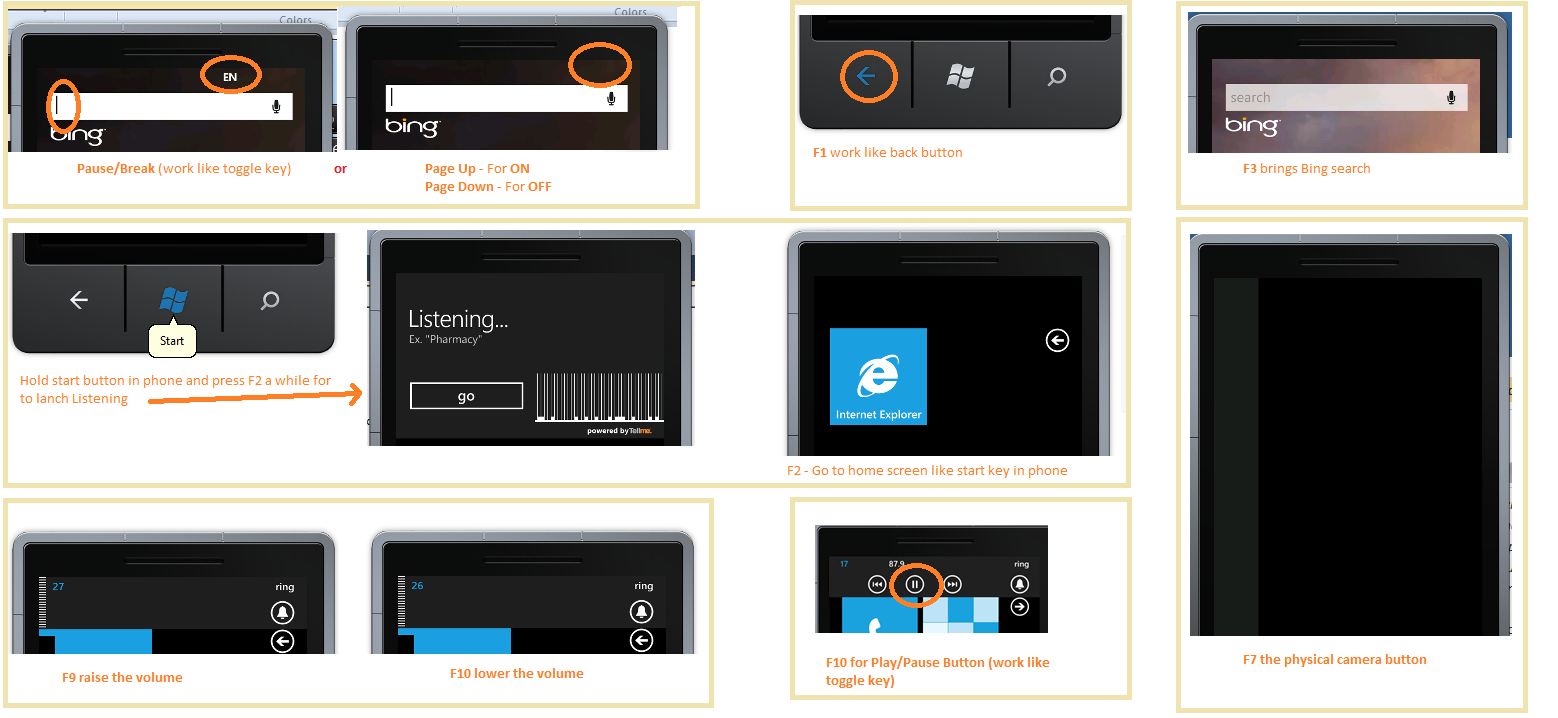
| Which Keys? | what is the Use? |
|---|---|
|
Pause Break |
This is for allow/deny system keybord to type in Emulator text boxes |
|
Page Up
Page Down |
This is for allow (Page up key)/deny (Page Down key) system keybord to type in Emulator text boxes |
|
F1
|
Work like back button on phone. |
|
F2
|
Work like phone windows key and if the phone’s Windows key was pressed(hold) Continuously pressing F2 in your system key board it for a while, it brings up the voice command / search interface. |
|
F3
|
Shows Bing search |
|
F7
|
The physical camera button. |
|
F9
|
Raise the volume. Pressing F9 key brings up a piece of UI, for controlling the currently playing music or radio, and switching the phone ringtone to vibrate. |
|
F10
|
Lower the volume. Pressing F10 key brings up a piece of UI, for controlling the currently playing music or radio, and switching the phone ringtone to vibrate. |
|
F10
|
Work like Play / Pause button – This is not a required hardware button for Windows Phone 7 emulator |
Use this shortcut key to work quickly with you favorite Windows Phone 7 Emulator.
Enjoy while coding..!
Thanks,
Naga Harish.