
In this post I am going to explain about Textarea(Multiline) in windows phone 7 (wp7). We did not have textarea control, but we can create textarea with Textbox itself. Even for textbox there is no property called Mutiline=”True”. It is easy to do check it..
In Silverlight for Windows Phone didn’t have textarea control. So, we need to use same Textbox as a textarea by changing few properties like AcceptsReturn value to True (AcceptsReturn=”True”), to allow enter key in the textbox. we can see TextWrapping property for wrap the text automatically (TextWrapping=”Wrap”). So, the overflow text will just shown in separate line. Re-commanded : to get Textarea look we need to set the height , for example height=”160″, see this XAML code
<TextBox x:Name=”txtArea” AcceptsReturn=”True” Height=”160″ TextWrapping=”Wrap” />
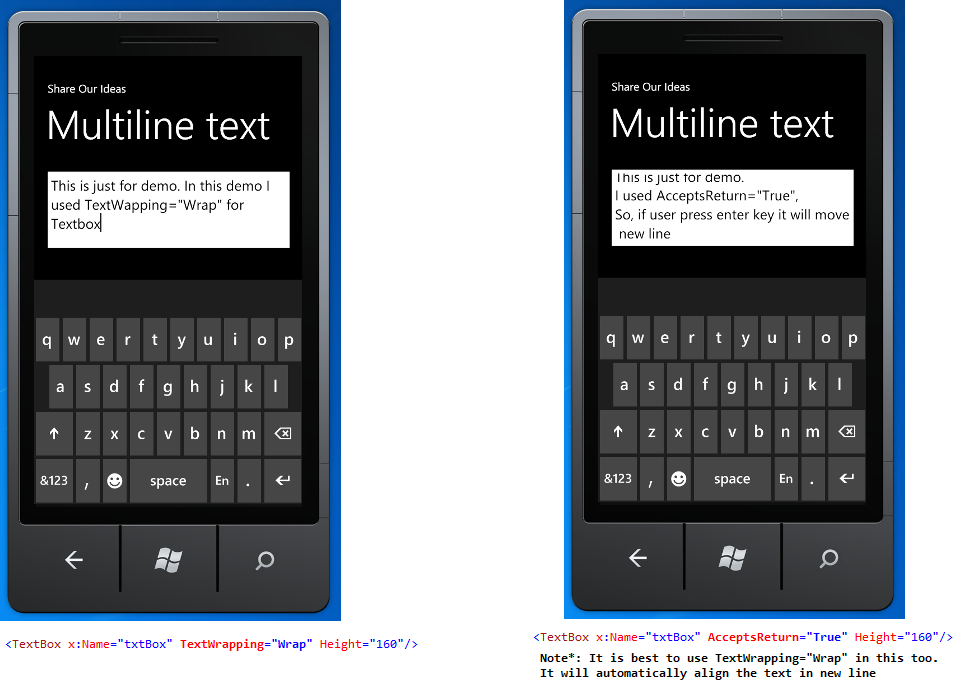
in this below image, first I used just TextWrapping=”Wrap” with height, so if I type more set in that it will align in new lines.
But in second, I used AcceptsReturn=”True” with height. I can just type few words and press enter it will move to new line.
Check with this image
See more Windows Phone 7 posts here
Enjoy while coding..!
Thanks,
Naga Harish.