
Internet Explorer is improved and come back with more features from IE 9. Started supporting SVG, BASE64 image, CANVAS and many more features. Now, IE 10 developer preview is comes with windows 8 developer preview.

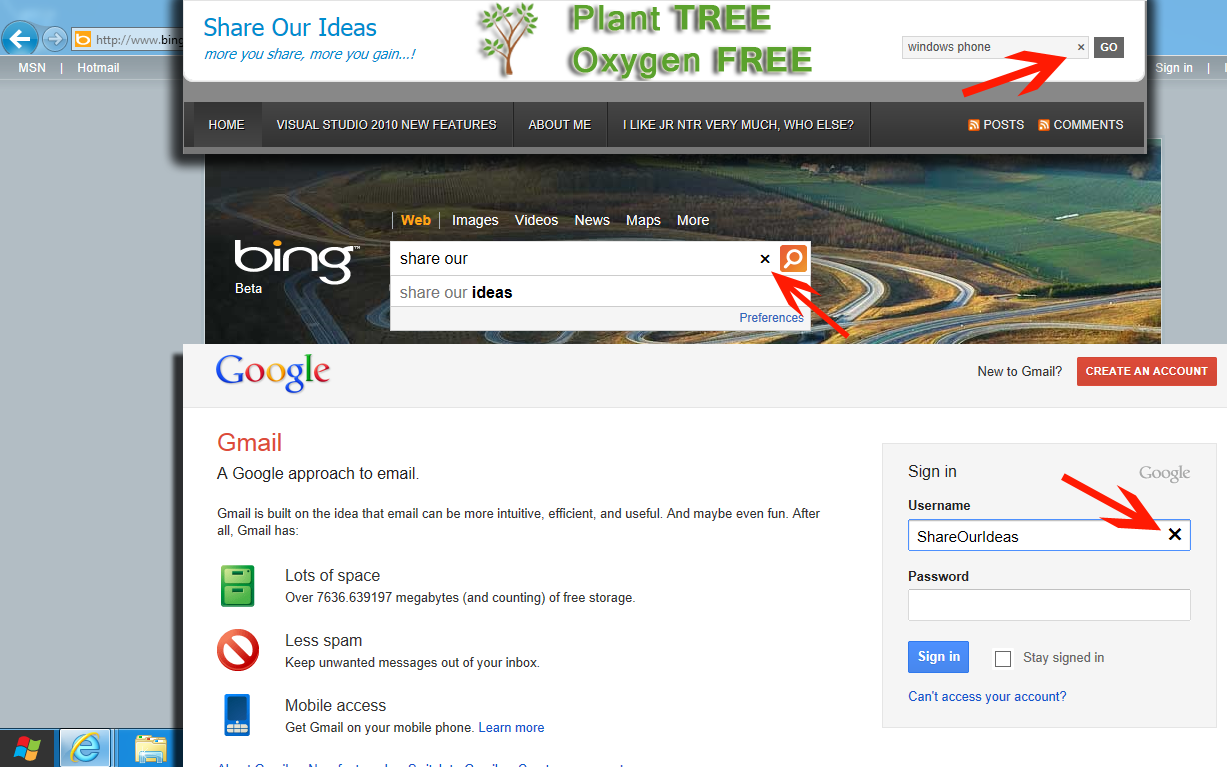
This version having more features than existing IE9. IE 10 automatically adding clear button at end of the text box (just “X” mark). When we click on “X” mark it will clear the entered text. This clear button displaying only when we focus on textbox to start enter something..
Hopefully, it is very helpful when we work with touch devices (Windows tablets and Windows 8 with touch screens).
Here we can see few screen shots which I taken while typing in bing.com and gmail.com and my blog…
More interesting updates on the way… keep watching..
Update on March 20,2012 :
How to remove auto clear button in Text box in IE 10 :
A Web developer can hide clear button using the CSS pseudo-class “::-ms-clear” and setting style “display” to “none”. For example,
input[type=text]::-ms-clear { display: none; }
more details here : http://msdn.microsoft.com/en-us/library/windows/apps/hh465740.aspx
Special thanks to Scott Hanselman and Rey Bango!